
Even though digital display technologies have become the standard, the VGA cable remains an important connection solution for millions of users worldwide. From older desktop computers and office projectors to industrial equipment and educational institutions, VGA continues to serve as a dependable display interface.
If you’ve ever connected a monitor to a PC manufactured before HDMI became popular, you’ve probably used a VGA cable. While newer technologies offer better image quality and audio support, VGA still has practical value in many environments where legacy hardware remains in operation.
This comprehensive guide explains everything you need to know about VGA cables, including how they work, where they’re used, their advantages, limitations, and how to choose the right cable for your needs.
What Is a VGA Cable?
A VGA cable (Video Graphics Array cable) is an analog video cable designed to transmit video signals from a computer or other compatible device to a monitor, projector, or television.
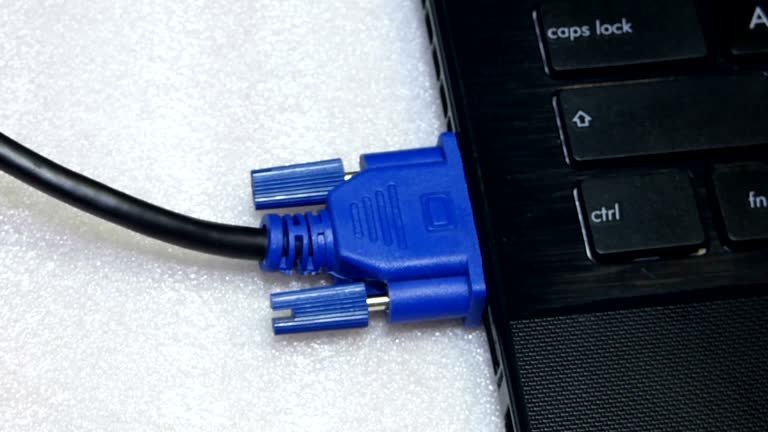
Introduced by IBM in 1987, VGA quickly became one of the most widely adopted display standards. It uses a distinctive 15-pin connector arranged in three rows, making it instantly recognizable.
Unlike HDMI or DisplayPort, VGA carries only video signals. Audio must be transmitted using a separate cable if needed.
History of VGA Cable Technology
The VGA standard was introduced alongside IBM’s PS/2 computers and represented a significant improvement over earlier display technologies.
Over the years, VGA became the universal connection for:
- Desktop computers
- CRT monitors
- LCD monitors
- Projectors
- Industrial control systems
- Educational equipment
Although digital interfaces have largely replaced VGA in consumer electronics, it remains widely used in businesses, schools, hospitals, and manufacturing facilities.
How a VGA Cable Works
A VGA cable transfers analog video signals between devices.
Here’s the basic process:
- The computer’s graphics card generates an analog video signal.
- The VGA cable carries that signal.
- The monitor interprets the analog information.
- The display renders the image on screen.
Because the signal is analog, image quality depends on cable quality, cable length, and electromagnetic interference.
Main Components of a VGA Cable
Understanding the parts of a VGA cable helps when selecting the right one.
15-Pin Connector
Every standard VGA connector contains 15 pins that transmit video information and synchronization signals.
Shielded Wiring
Higher-quality cables include shielding that minimizes interference from nearby electrical devices.
Ferrite Beads
Many premium VGA cables feature ferrite cores near each connector.
These reduce electrical noise and improve signal stability.
Screw Locks
The small screws on both sides of the connector secure the cable and prevent accidental disconnection.
Common Uses of VGA Cable
Although newer technologies dominate modern devices, VGA still has numerous applications.
Office Computers
Many offices continue using legacy desktop systems connected through VGA.
Schools and Universities
Educational institutions often use VGA-compatible projectors in classrooms.
Industrial Equipment
Factories frequently operate machinery with older control systems requiring VGA displays.
Medical Devices
Certain medical imaging systems still support VGA connections.
Conference Rooms
Older projectors installed in meeting rooms commonly rely on VGA inputs.
Types of VGA Cable
Not all VGA cables are identical.
Standard VGA Cable
Suitable for everyday monitor connections.
Long-Distance VGA Cable
Designed for installations where the display is located far from the computer.
Shielded VGA Cable
Offers improved protection against signal interference.
VGA Extension Cable
Extends the reach of an existing VGA connection.
VGA Splitter Cable
Allows one video source to connect to multiple displays, although image quality may vary.
VGA Cable vs HDMI
Choosing between VGA and HDMI depends on your equipment.
| Feature | VGA Cable | HDMI |
|---|---|---|
| Signal Type | Analog | Digital |
| Audio Support | No | Yes |
| Maximum Image Quality | Lower | Higher |
| Resolution | Up to 1080p (varies) | 4K and beyond |
| Compatibility | Older devices | Modern devices |
HDMI generally provides sharper images and simpler connectivity, but VGA remains valuable for older hardware.
VGA Cable vs DisplayPort
DisplayPort is designed for high-performance digital displays.
Compared to VGA:
- Better image quality
- Higher refresh rates
- Audio support
- Multi-monitor capability
However, VGA remains useful where DisplayPort isn’t available.
VGA Cable vs DVI
DVI occupies a middle ground between VGA and HDMI.
Differences include:
- VGA uses analog signals.
- DVI may use analog or digital signals.
- Digital DVI produces clearer images.
- VGA offers broader compatibility with legacy devices.
Advantages of Using a VGA Cable
Despite its age, VGA still offers several benefits.
Wide Compatibility
Millions of older monitors and projectors support VGA.
Affordable
VGA cables are inexpensive compared to many specialty display cables.
Easy Installation
Simply connect both ends and tighten the screws.
Reliable for Legacy Equipment
Businesses with existing hardware can continue operating without costly upgrades.
Long Service Life
Quality VGA cables often last for years when handled properly.
Limitations of VGA Cable
Understanding its drawbacks helps set realistic expectations.
Analog Signal
Analog transmission is more susceptible to interference.
No Audio
Separate audio cables are necessary.
Lower Image Quality
Digital interfaces generally produce sharper visuals.
Limited Resolution
While VGA can support high resolutions under ideal conditions, it isn’t intended for today’s highest-resolution displays.
Larger Connector
The 15-pin connector occupies more space than modern alternatives.
How to Choose the Best VGA Cable
Several factors should influence your purchase.
Cable Length
Use the shortest cable practical for your setup.
Long cables may reduce signal quality.
Shielding
Choose double-shielded cables when operating near electrical equipment.
Build Quality
Gold-plated connectors resist corrosion and improve durability.
Ferrite Cores
These help reduce interference.
Brand Reputation
Well-manufactured cables often provide better long-term performance.
Tips for Installing a VGA Cable
Proper installation improves reliability.
- Turn off equipment before connecting.
- Tighten both connector screws.
- Avoid bending the cable sharply.
- Keep the cable away from power lines.
- Inspect connectors regularly for damage.
Following these steps helps maintain consistent video quality.
Common VGA Cable Problems and Solutions
Blurry Image
Possible causes include:
- Poor cable quality
- Loose connector
- Long cable length
No Display
Check:
- Monitor input selection
- Cable connections
- Graphics settings
Screen Flickering
Possible reasons:
- Damaged cable
- Electromagnetic interference
- Faulty graphics output
Color Distortion
Bent connector pins often cause missing color channels.
Inspect the connector carefully.
Can VGA Still Be Used in 2026?
Yes.
Although modern computers increasingly omit VGA ports, many organizations continue using equipment designed around VGA connectivity.
Typical examples include:
- Schools
- Government offices
- Manufacturing plants
- Hospitals
- Older conference room projectors
Adapters can also connect VGA devices to newer systems, though functionality depends on the specific conversion.
VGA Adapters and Converters
Sometimes devices use different connection standards.
Common options include:
HDMI to VGA
Useful when connecting modern laptops to older projectors.
VGA to HDMI
Converts analog output for newer displays.
USB to VGA
Adds VGA capability through a USB adapter.
DisplayPort to VGA
Allows digital computers to connect to VGA monitors.
Active converters generally provide better compatibility than passive adapters.
Maintenance Tips for VGA Cables
Good maintenance extends cable lifespan.
- Store cables loosely coiled.
- Avoid excessive pulling.
- Keep connectors clean.
- Protect cables from moisture.
- Replace damaged cables promptly.
Simple care can keep a VGA cable functioning reliably for years.
Future of VGA Technology
The technology is gradually disappearing from new consumer devices.
However, replacement will take time because countless businesses still depend on legacy hardware.
Manufacturers continue producing VGA cables due to ongoing demand in commercial and industrial markets.
Over the next several years, VGA will likely remain relevant wherever older equipment continues operating efficiently.
Conclusion
The VGA cable has played a major role in computer display technology for decades. Although digital interfaces such as HDMI and DisplayPort now dominate consumer electronics, VGA remains a dependable solution for legacy computers, projectors, industrial equipment, and educational environments.
Choosing a high-quality cable, using the appropriate length, and installing it correctly can help ensure stable video performance. For anyone maintaining older systems or connecting compatible devices, VGA continues to offer a practical and cost-effective display solution.Frequently Asked Questions (FAQs)
1. What is a VGA cable used for?
A VGA cable is primarily used to transmit analog video signals between a computer and a monitor, projector, or other compatible display.
2. Does a VGA cable carry audio?
No. VGA only carries video signals. A separate audio cable is required if sound is needed.
3. Is VGA better than HDMI?
For modern devices, HDMI generally provides superior image quality and supports both video and audio. VGA is mainly beneficial for compatibility with older equipment.
4. Can I connect a VGA monitor to a modern laptop?
Yes. If the laptop lacks a VGA port, you can typically use an appropriate adapter or active converter, depending on the available output ports.
5. How long can a VGA cable be without losing quality?
For best image quality, shorter cables are preferred. While longer cables can work, signal quality may gradually decrease as cable length increases, especially with lower-quality cables or higher display resolutions.
